Introduction
This is an updated version of the variant calling pipeline post published in 2016. This updated version employs GATK4 and is available as a containerized Nextflow script on GitHub.
Identifying genomic variants, including single nucleotide polymorphisms (SNPs) and DNA insertions and deletions (indels), from next generation sequencing data is an important part of scientific discovery. At the NYU Center for Genomics and Systems Biology (CGSB) this task is central to many research programs. For example, the Carlton Lab analyzes SNP data to study population genetics of the malaria parasites Plasmodium falciparum and Plasmodium vivax. The Gresham Lab uses SNP and indel data to study adaptive evolution in yeast, and the Lupoli Lab in the Department of Chemistry uses variant analysis to study antibiotic resistance in E. coli.
To facilitate this research, a bioinformatics pipeline has been developed to enable researchers to accurately and rapidly identify, and annotate, sequence variants. The pipeline employs the Genome Analysis Toolkit 4 (GATK4) to perform variant calling and is based on the best practices for variant discovery analysis outlined by the Broad Institute. Once SNPs have been identified, SnpEff is used to annotate, and predict, variant effects.
This pipeline is intended for calling variants in samples that are clonal - i.e. a single individual. The frequencies of variants in these samples are expected to be 1 (for haploids or homozygous diploids) or 0.5 (for heterozygous diploids). To call variants in samples that are heterogeneous, such as human tumors and mixed microbial populations, in which allele frequencies vary continuously between 0 and 1 researcher should use GATK4 Mutect2 which is designed to identify subclonal events (workflow coming soon).
Base Quality Score Recalibration (BQSR) is an important step for accurate variant detection that aims to minimize the effect of technical variation on base quality scores (measured as Phred scores). As with the original pipeline, this pipeline assumes that a ‘gold standard’ set of SNPS and indels are not available for BQSR. In the absence of a gold standard the pipeline performs an initial step detecting variants without performing BQSR, and then uses the identified SNPs as input for BQSR before calling variants again. This process is referred to as bootstrapping and is the procedure recommended by the Broad Institute’s best practices for variant discovery analysis when a gold standard is not available.
This pipeline uses nextflow, a framework that enables reproducible and portable workflows. The full pipeline and instructions on how to use the Nextflow script are described below.
Script Location
greene
/scratch/work/cgsb/scripts/variant_calling/gatk4/main.nf
- You don’t need to copy the script, but you should copy the file
nextflow.configfrom the above directory into a new project directory. (/scratch/work/cgsb/scripts/variant_calling/gatk4/nextflow.config) - If you want to copy and run the
main.nfscript locally, you must copy the/bindirectory as well. This needs to be in the same directory asmain.nf. - You will set parameters for your analysis in the
nextflow.configfile. - See How to Use and Examples below to learn how to configure and run the script.
- This Nextflow script uses pre-installed software modules on the NYU HPC, and is tailored to the unique file naming scheme used by the Genomics Core at the NYU CGSB.
github
https://github.com/gencorefacility/variant-calling-pipeline-gatk4
- This version of the script is configured for standard Illumina filenames.
- This version of the script does not use software modules local to the NYU HPC, it is instead packaged with a Docker container which has all tools used in the pipeline. Integration with Docker allows for completely self-contained and truly reproducible analysis. This example shows how to run the workflow using the container. The container is hosted on Docker at: https://hub.docker.com/r/gencorefacility/variant-calling-pipeline-gatk4
Full List of Tools
- GATK4
- BWA
- Picard Tools
- Samtools
- SnpEff
- R (dependency for some GATK steps)
How to Use This Script
Setting Up Nextflow
This pipeline is written in Nextflow. The easiest way to get setup is with conda. On NYU HPC, conda is already installed as a module.
module load anaconda3/2019.10
Note: Use module avail anaconda to check for the latest conda version.
Update: NYU HPC users can load Nextflow using the module load command. There is no need to install via conda. Simply load the module and skip to “Setting Up The Script” below.
For users outside NYU, see conda installation instructions, then follow the rest below.
Once you have conda loaded, add the bioconda channel and others. Important to add them in this order:
conda config --add channels defaults
conda config --add channels bioconda
conda config --add channels conda-forge
Create a conda environment:
conda create --name nf-env
Activate it:
conda activate nf-env
When loaded, you’ll see:
(nf-env) [user@log-1 ~]$
Install nextflow:
conda install nextflow
When finished, deactivate with conda deactivate.
Setting Up The Script
Once you have Nextflow setup, we can run the pipeline. The pipeline requires six mandatory input parameters:
1) params.reads - The directory with your FastQ libraries, including a glob path matcher. Must include paired end group pattern (i.e. {1,2}).
Example:
params.reads = "/path/to/data/*_n0{1,2}_*.fastq.gz"
or
params.reads = "/path/to/data/*_R{1,2}_*.fastq.gz"
2) params.ref - Reference genome in fasta format. If at NYU CGSB, check the Shared Genome Resource (/scratch/work/cgsb/genomes/Public/). If using your own reference, you need to build index files for BWA, a fasta index (samtools), and a reference dictionary (Picard Tools), all in the same directory as the reference fasta.
3) params.snpeff_db - The name of the SnpEff database. To determine it:
# On the NYU HPC you can load SnpEff using module load
module load snpeff/4.3i

# $SNPEFF_JAR is the path to the snpEff.jar file.
# On the NYU HPC this is automatically set to the
# snpEff.jar path when the module is loaded
java -jar $SNPEFF_JAR databases | grep -i SPECIES_NAME
From the list of returned results, select the database you wish to use. The value of the first column is the value to input for params.snpeff_db.
For example, for Arabidopsis Thaliana:
java -jar $SNPEFF_JAR databases | grep -i thaliana
Output:
athalianaTair10 Arabidopsis_Thaliana http://downloads.sourceforge.net/...
Then: params.snpeff_db='athalianaTair10'
Note: If your organism is not available, you can create a custom SnpEff Database if a reference fasta and gff file are available.
4) params.outdir - By default, output files go to params.outdir/out, temporary GATK files to params.outdir/gatk_temp, SnpEff database files to params.outdir/snpeff_db, and Nextflow will run analysis in params.outdir/nextflow_work_dir. These can be overridden with params.out, params.tmpdir, params.snpeff_data, and workDir respectively. Note: no params. prefix for workDir.
5) params.pl - Platform. E.g. Illumina (required for read groups).
6) params.pm - Machine. E.g. nextseq (required for read groups).
Examples
Note: If you are working on the NYU HPC, you should run all nextflow jobs in an interactive slurm session. This is because Nextflow uses some resources in managing your workflow.
Scenario 1: Hard code all parameters in config file
Copy nextflow.config into a new directory. Edit the first six parameters:
params.reads = "/path/to/reads/*_n0{1,2}_*.fastq.gz"
params.ref = "/path/to/ref.fa"
params.outdir = "/scratch/user/gatk4/"
params.snpeff_db = "athalianaTair10"
params.pl = "illumina"
params.pm = "nextseq"
After activating your conda environment:
nextflow run main.nf
You can specify a different config file:
nextflow run main.nf -c your.config
Note: Parameters in the config can be overridden by command line arguments.
Scenario 2: Command line parameters
nextflow run main.nf \
    --reads "/path/to/reads/*_n0{1,2}_*.fastq.gz" \
    --ref "/path/to/ref.fa" \
    --outdir "/scratch/user/gatk4/" \
    --snpeff_db "athalianaTair10" \
    --pl "illumina" \
    --pm "illumina"
Scenario 3: Call directly from GitHub
nextflow run gencorefacility/variant-calling-pipeline-gatk4
Still need the config file or pass parameters via command line.
Scenario 4: Use with Docker container
nextflow run gencorefacility/variant-calling-pipeline-gatk4 -with-docker gencorefacility/variant-calling-pipeline-gatk4
Launching Nextflow
Once running, Nextflow actively manages and monitors jobs. On NYU HPC, the config has process.executor = 'slurm' for SLURM submission. Monitor with:
watch squeue -u <netID>
Note: The session must remain open. Recommend using tmux, nohup, or submitting as a SLURM job.
Enter tmux, launch an interactive slurm session, activate conda, then launch Nextflow. Detach from tmux with ctrl+B then D. Reattach with tmux a.
If interrupted, resume with:
nextflow run main.nf -resume
Workflow Overview
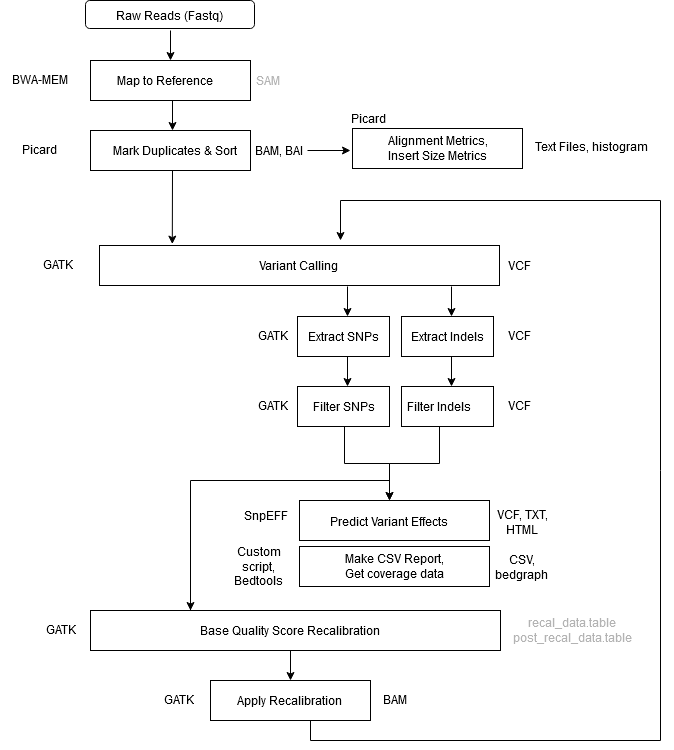
Step 1 - Alignment - Map to Reference
| Field | Value |
|---|---|
| Tool | BWA MEM |
| Input | .fastq files, reference genome |
| Output | aligned_reads.sam |
| Notes | -Y tells BWA to use soft clipping for supplementary alignments. -K tells BWA to process INT input bases in each batch regardless of nThreads (for reproducibility). Readgroup info is provided with the -R flag. This information is key for downstream GATK functionality. GATK will not work without a read group tag. |
Command:
bwa mem \
    -K 100000000 \
    -Y \
    -R '@RG\tID:sample_1\tLB:sample_1\tPL:ILLUMINA\tPM:HISEQ\tSM:sample_1' \
    ref.fa \
    sample_1_reads_1.fq \
    sample_1_reads_2.fq \
    > aligned_reads.sam
Step 2 - Mark Duplicates + Sort
| Field | Value |
|---|---|
| Tool | GATK4 MarkDuplicatesSpark |
| Input | aligned_reads.sam |
| Output | sorted_dedup_reads.bam, sorted_dedup_reads.bam.bai, dedup_metrics.txt |
| Notes | In GATK4, the Mark Duplicates and Sort Sam steps have been combined into one step using MarkDuplicatesSpark. The BAM index file (.bai) is created by default. The tool is optimized to run on queryname-grouped alignments. The output of BWA is query-grouped, however if provided coordinate-sorted alignments, the tool will spend additional time first queryname sorting the reads internally. Due to this internal sorting, the tool produces identical results regardless of input sort-order. You don’t need a Spark cluster to run Spark-enabled GATK tools - the engine can use Spark to create a virtual standalone cluster and use available CPU cores. |
Command:
gatk MarkDuplicatesSpark \
    -I aligned_reads.sam \
    -M dedup_metrics.txt \
    -O sorted_dedup_reads.bam
Step 3 - Collect Alignment & Insert Size Metrics
| Field | Value |
|---|---|
| Tool | Picard Tools, R, Samtools |
| Input | sorted_dedup_reads.bam, reference genome |
| Output | alignment_metrics.txt, insert_metrics.txt, insert_size_histogram.pdf, depth_out.txt |
Commands:
java -jar picard.jar \
    CollectAlignmentSummaryMetrics \
    R=ref.fa \
    I=sorted_dedup_reads.bam \
    O=alignment_metrics.txt
java -jar picard.jar \
    CollectInsertSizeMetrics \
    INPUT=sorted_dedup_reads.bam \
    OUTPUT=insert_metrics.txt \
    HISTOGRAM_FILE=insert_size_histogram.pdf
samtools depth -a sorted_dedup_reads.bam > depth_out.txt
Step 4 - Call Variants
| Field | Value |
|---|---|
| Tool | GATK4 HaplotypeCaller |
| Input | sorted_dedup_reads.bam, reference genome |
| Output | raw_variants.vcf |
| Notes | First round of variant calling. The variants identified in this step will be filtered and provided as input for Base Quality Score Recalibration (BQSR). |
Command:
gatk HaplotypeCaller \
    -R ref.fa \
    -I sorted_dedup_reads.bam \
    -O raw_variants.vcf
Step 5 - Extract SNPs & Indels
| Field | Value |
|---|---|
| Tool | GATK4 SelectVariants |
| Input | raw_variants.vcf, reference genome |
| Output | raw_indels.vcf, raw_snps.vcf |
| Notes | This step separates SNPs and Indels so they can be processed and used independently. |
Commands:
gatk SelectVariants \
    -R ref.fa \
    -V raw_variants.vcf \
    -select-type SNP \
    -O raw_snps.vcf
gatk SelectVariants \
    -R ref.fa \
    -V raw_variants.vcf \
    -select-type INDEL \
    -O raw_indels.vcf
Step 6 - Filter SNPs
| Field | Value |
|---|---|
| Tool | GATK4 VariantFiltration |
| Input | raw_snps.vcf, reference genome |
| Output | filtered_snps.vcf, filtered_snps.vcf.idx |
| Notes | See filter descriptions below. |
Filter descriptions:
- QD < 2.0 - Variant confidence divided by unfiltered depth of non-hom-ref samples. Normalizes variant quality to avoid inflation from deep coverage.
- FS > 60.0 - Phred-scaled probability of strand bias. Close to 0 when no strand bias.
- MQ < 40.0 - Root mean square mapping quality. Around 60 when mapping qualities are good.
- SOR > 4.0 - Strand bias test similar to symmetric odds ratio test. Created because FS tends to penalize variants at exon ends.
- MQRankSum < -12.5 - Compares mapping qualities of reads supporting reference vs alternate alleles.
- ReadPosRankSum < -8.0 - Compares positions of reference and alternate alleles within reads. Alleles only near read ends indicates error.
Learn more: Hard-filtering germline short variants
Note: SNPs ‘filtered out’ remain in the file marked as ‘_filter’, passing ones marked as ‘PASS’. We extract passing SNPs for BQSR in the next step.
Command:
gatk VariantFiltration \
    -R ref.fa \
    -V raw_snps.vcf \
    -O filtered_snps.vcf \
    -filter-name "QD_filter" -filter "QD < 2.0" \
    -filter-name "FS_filter" -filter "FS > 60.0" \
    -filter-name "MQ_filter" -filter "MQ < 40.0" \
    -filter-name "SOR_filter" -filter "SOR > 4.0" \
    -filter-name "MQRankSum_filter" -filter "MQRankSum < -12.5" \
    -filter-name "ReadPosRankSum_filter" -filter "ReadPosRankSum < -8.0"
Step 7 - Filter Indels
| Field | Value |
|---|---|
| Tool | GATK4 VariantFiltration |
| Input | raw_indels.vcf, reference genome |
| Output | filtered_indels.vcf, filtered_indels.vcf.idx |
| Notes | See filter descriptions below. |
Filter descriptions:
- QD < 2.0 - Variant confidence divided by unfiltered depth of non-hom-ref samples.
- FS > 200.0 - Phred-scaled probability of strand bias (higher threshold for indels).
- SOR > 10.0 - Strand bias test (higher threshold for indels).
Note: Indels ‘filtered out’ remain in the file marked as ‘_filter’, passing ones marked as ‘PASS’. We extract passing indels for BQSR next.
Command:
gatk VariantFiltration \
    -R ref.fa \
    -V raw_indels.vcf \
    -O filtered_indels.vcf \
    -filter-name "QD_filter" -filter "QD < 2.0" \
    -filter-name "FS_filter" -filter "FS > 200.0" \
    -filter-name "SOR_filter" -filter "SOR > 10.0"
Step 8 - Exclude Filtered Variants
| Field | Value |
|---|---|
| Tool | GATK4 SelectVariants |
| Input | filtered_snps.vcf, filtered_indels.vcf |
| Output | bqsr_snps.vcf, bqsr_indels.vcf |
| Notes | Extract only the passing variants as input to BQSR. |
Commands:
gatk SelectVariants \
    --exclude-filtered \
    -V filtered_snps.vcf \
    -O bqsr_snps.vcf
gatk SelectVariants \
    --exclude-filtered \
    -V filtered_indels.vcf \
    -O bqsr_indels.vcf
Step 9 - Base Quality Score Recalibration (BQSR) #1
| Field | Value |
|---|---|
| Tool | GATK4 BaseRecalibrator |
| Input | sorted_dedup_reads.bam (from step 2), bqsr_snps.vcf, bqsr_indels.vcf, reference genome |
| Output | recal_data.table |
| Notes | BQSR is performed twice. The second pass is optional, only required to produce a recalibration report. |
Command:
gatk BaseRecalibrator \
    -R ref.fa \
    -I sorted_dedup_reads.bam \
    --known-sites bqsr_snps.vcf \
    --known-sites bqsr_indels.vcf \
    -O recal_data.table
Step 10 - Apply BQSR
| Field | Value |
|---|---|
| Tool | GATK4 ApplyBQSR |
| Input | recal_data.table, sorted_dedup_reads.bam, reference genome |
| Output | recal_reads.bam |
| Notes | This step applies the recalibration computed in the first BQSR step to the bam file. This recalibrated bam file is now analysis-ready. |
Command:
gatk ApplyBQSR \
    -R ref.fa \
    -I sorted_dedup_reads.bam \
    -bqsr recal_data.table \
    -O recal_reads.bam
Step 11 - Base Quality Score Recalibration (BQSR) #2
| Field | Value |
|---|---|
| Tool | GATK4 BaseRecalibrator |
| Input | recal_reads.bam, bqsr_snps.vcf, bqsr_indels.vcf, reference genome |
| Output | post_recal_data.table |
| Notes | This round of BQSR is optional. Required if you want to produce a recalibration report with Analyze Covariates. Uses recalibrated reads from Apply BQSR as input. |
Command:
gatk BaseRecalibrator \
    -R ref.fa \
    -I recal_reads.bam \
    --known-sites bqsr_snps.vcf \
    --known-sites bqsr_indels.vcf \
    -O post_recal_data.table
Step 12 - Analyze Covariates
| Field | Value |
|---|---|
| Tool | GATK4 AnalyzeCovariates |
| Input | recal_data.table, post_recal_data.table |
| Output | recalibration_plots.pdf |
| Notes | Produces a recalibration report based on the output from the two BQSR runs. |
Command:
gatk AnalyzeCovariates \
    -before recal_data.table \
    -after post_recal_data.table \
    -plots recalibration_plots.pdf
Step 13 - Call Variants (Second Round)
| Field | Value |
|---|---|
| Tool | GATK4 HaplotypeCaller |
| Input | recal_reads.bam, reference genome |
| Output | raw_variants_recal.vcf |
| Notes | Second round of variant calling performed using recalibrated (analysis-ready) bam. |
Command:
gatk HaplotypeCaller \
    -R ref.fa \
    -I recal_reads.bam \
    -O raw_variants_recal.vcf
Step 14 - Extract SNPs & Indels (Second Round)
| Field | Value |
|---|---|
| Tool | GATK4 SelectVariants |
| Input | raw_variants_recal.vcf, reference genome |
| Output | raw_indels_recal.vcf, raw_snps_recal.vcf |
| Notes | Separates SNPs and Indels for independent processing and analysis. |
Commands:
gatk SelectVariants \
    -R ref.fa \
    -V raw_variants_recal.vcf \
    -select-type SNP \
    -O raw_snps_recal.vcf
gatk SelectVariants \
    -R ref.fa \
    -V raw_variants_recal.vcf \
    -select-type INDEL \
    -O raw_indels_recal.vcf
Step 15 - Filter SNPs (Final)
| Field | Value |
|---|---|
| Tool | GATK4 VariantFiltration |
| Input | raw_snps_recal.vcf, reference genome |
| Output | filtered_snps_final.vcf, filtered_snps_final.vcf.idx |
| Notes | Same filters as Step 6. SNPs ‘filtered out’ remain in the file marked as ‘_filter’, passing ones marked as ‘PASS’. |
Command:
gatk VariantFiltration \
    -R ref.fa \
    -V raw_snps_recal.vcf \
    -O filtered_snps_final.vcf \
    -filter-name "QD_filter" -filter "QD < 2.0" \
    -filter-name "FS_filter" -filter "FS > 60.0" \
    -filter-name "MQ_filter" -filter "MQ < 40.0" \
    -filter-name "SOR_filter" -filter "SOR > 4.0" \
    -filter-name "MQRankSum_filter" -filter "MQRankSum < -12.5" \
    -filter-name "ReadPosRankSum_filter" -filter "ReadPosRankSum < -8.0"
Step 16 - Filter Indels (Final)
| Field | Value |
|---|---|
| Tool | GATK4 VariantFiltration |
| Input | raw_indels_recal.vcf, reference genome |
| Output | filtered_indels_final.vcf, filtered_indels_final.vcf.idx |
| Notes | Same filters as Step 7. Indels ‘filtered out’ remain marked as ‘_filter’, passing ones marked as ‘PASS’. |
Command:
gatk VariantFiltration \
    -R ref.fa \
    -V raw_indels_recal.vcf \
    -O filtered_indels_final.vcf \
    -filter-name "QD_filter" -filter "QD < 2.0" \
    -filter-name "FS_filter" -filter "FS > 200.0" \
    -filter-name "SOR_filter" -filter "SOR > 10.0"
Step 17 - Annotate SNPs and Predict Effects
| Field | Value |
|---|---|
| Tool | SnpEff |
| Input | filtered_snps_final.vcf |
| Output | filtered_snps_final.ann.vcf, snpeff_summary.html, snpEff_genes.txt |
Command:
java -jar snpEff.jar -v \
    <snpeff_db> \
    filtered_snps_final.vcf > filtered_snps_final.ann.vcf
Step 18 - Compile Statistics
| Field | Value |
|---|---|
| Tool | parse_metrics.sh (in /bin) |
| Input | sample_id_alignment_metrics.txt, sample_id_insert_metrics.txt, sample_id_dedup_metrics.txt, sample_id_raw_snps.vcf, sample_id_filtered_snps.vcf, sample_id_raw_snps_recal.vcf, sample_id_filtered_snps_final.vcf, sample_id_depth_out.txt |
| Output | report.csv |
| Notes | A single report file is generated with summary statistics for each library: # of Reads, # of Aligned Reads, % Aligned, # Aligned Bases, Read Length, % Paired, % Duplicate, Mean Insert Size, # SNPs, # Filtered SNPs, # SNPs after BQSR, # Filtered SNPs after BQSR, Average Coverage. |
Command:
parse_metrics.sh sample_id > sample_id_report.csv
Give the script a sample id and it will look for the corresponding sample_id_* files and print the statistics and header to stdout.
37 Comments
This workflow can also be ran as an SBATCH rather than interactively. The SBATCH options to change would be job-name, output, and possibly time. The resources set in SBATCH are only for the job controller nextflow and not the actual compute, so no need to increase. The resources for your compute would be set in the config file given. Job process can be monitored in the slurm output file you set.
#!/bin/bash
#SBATCH –nodes=1
#SBATCH –ntasks-per-node=1
#SBATCH –cpus-per-task=2
#SBATCH –time=5:00:00
#SBATCH –mem=2GB
#SBATCH –job-name=myJob
#SBATCH –output=slurm_%j.out
module purge
module load nextflow/20.10.0
nextflow run main.nf -c your.config
Thank you so much for this elaborate workflow Mohammed. However I am continuously getting this error nextflow.exception.AbortOperationException: Not a valid project name: main.nf when I run nextflow run main.nf. Thank you in advance!
This error means there is no main.nf file in your working directory. You should change into the directory where the main.nf script is located and then run nextflow run main.nf.
Glad to see you could use that filter/tap trick, and the adoption of nextflow generally. Cleanly written.
Does NYU HPC let you use Docker?
Thank you Darach, I'm really liking nextflow. There are a couple other workflows on our git too. Have you had the opportunity to test out the modules feature? I'm interested to try that next.
We use Singularity on the HPC which supports the use of Docker containers.
No, I haven't seen modules yet. It looks like a really smart idea. I look forward to what y'all write in that; I know that'll be really cleanly done.
Ah, so it makes sense to write it as a Docker recipe, because then that's more flexible for users in both platforms. Presumably folks using cloud-computing will appreciate that.
I'm going to copy the way you're writing channel operators in the actual input field. I hadn't thought to do that, and I think that style is a much cleaner way of organizing nextflow. Thanks for sharing your code with everyone, for direct use and inspiration.
Thank you for the kind words Darach, I value your feedback.
Hi Mohammed, I got an error at the markDuplicatesSpark step caused by: java.lang.IllegalStateException: Duplicate key A00431:16:H5JTVDSXX:1:1101:27308:32972 (attempted merging values -1 and -1). I wonder what it is all about, I have tried to figure out how to go about this and failed. Thank you in advance.
Was able to resolve this by upgrading my GATK version from V4.0.4.0 to V4.0.5.0. Thank you!
Hi there,
Iam continuosly getting this error below;
Process `haplotypeCaller (1)` terminated with an error exit status (2)
A USER ERROR has occurred: Traversal by intervals was requested but some input files are not indexed.
Please index all input files:
samtools index ………………._sorted_dedup.bam
Set the system property GATK_STACKTRACE_ON_USER_EXCEPTION (–java-options '-DGATK_STACKTRACE_ON_USER_EXCEPTION=true') to print the stack trace.
I attempted to index it manually with samtools however when I resumed the process. it couldn't locate my indexed bam files.
Your help is much appreciated.
Hi, Mohammed. Thank you for the great pipeline.
I would like to use this pipeline for strain tracking of pathogenic bacteria in our society based on SNVs, and I have one question.
How can we mask (exclude) some genomic regions from the reference genome ? To go around false-positive SNVs, we usually exclude repetitive region as short reads are not correctly mapped to these regions. We also exclude dense SNVs that are due to incorrect mapping using filtering of window size 12 bp. Can we do this as well ? Many thanks for your kind support.
Hi Yoshi,
You can use provide haplotypecaller with an intervals file with the -L option, and it will work on only the regions defined in this file. See https://gatk.broadinstitute.org/hc/en-us/articles/360035531852-Intervals-and-interval-lists.
Hi Mohammed, thanks so much for this comprehensive pipeline. I was wondering, do I need to cat and trim (with trimmomatic) my raw reads prior to starting the pipeline?
Hi Diego, there is no strict rule, but it's probably better to do this.
Is this pipeline for an individual sample? I don't see any merging steps anywhere. At what point should I merge the samples if I were to use this? BAM files or the VCF's?
Hi Niyomi,
This pipeline operates HaplotypeCaller in its default mode on a single sample. If you would like to do joint genotyping for multiple samples, the pipeline is a little different. You would need to add the
-ERC GVCFoption to HaplotypeCaller to generate an intermediate GVCF, and then run gatk GenotypeGVCFs using the intermediary GVCFs as input.Thank you for your reply. Yes, I am familiar with the -ERC GVCF. My question is, do you use this pipeline to process each sample individually or do you merge samples at any point? In other words, do I follow this pipeline 250 times for 250 samples? Thank you in advance.
This pipeline operates on each sample individually, it does not merge samples at any point, so yes you would follow the pipeline 250 times for 250 samples. The nextflow script takes care of this.
Hi Niyomi,
I am running it on multiple human genome sequence samples (bam files). Could you please share your experience of working to adopt this script to multiple samples?
Which steps should I customize if I use single read sequencing instead of paired end run? Thanks a lot!
Primarily the alignment step, and the way input reads are parsed by nextflow. CollectInsertSizeMetrics in the parse metrics step will fail, as will this part of the final QC step.
Thanks for your sharing. Still I have a basic question. When we use GATK HaplotypeCaller, it costs a lot of time (800M genome, 15* coverage, 5-7days, per sample). Should I set “NUMBERTHREADS” or “Xmx96g”in this step?
Hello, thanks for this pipeline, it's very helpful!
I was able to substitute bwa for minimap2 command, however with minimap2 I need to use picard AddOrReplaceReadGroups command before gatk MarkDuplicatesSpark. Can I add another process in main.nf? I've tried, but no success so far.
Hi Nathalia, you can add another process but you will also need to setup the input channel to send data into that process, and setup the channel to send output from the new process to MarkDuplicatesSpark.
Hi Mohammed
I am trying to do variant calling and I have human cell lines. I am really confused that why your pipeline doesn't not use Goldstandard SNPs and dbSNPs like in GATK? And Can i Run this for human data?
Hi Zeehan,
This workflow is adapted for organisms that do not have gold standard SNPs available. If you're working with human data I would check out broads official workflows such as this one: https://github.com/gatk-workflows/gatk4-germline-snps-indels
Hello,
My question is that why the BQSR step is after haplotype variant calling. I think all the BAM record post-processing (like sort + remote duplicates + BQSR) should be before variant calling. Let me know if this is wrong? Can I follow the same step for somatic mutation identification (using mutect2 in place of gatk haplotype caller)?
Hi Mohammed,
First thank you for providing this pipeline publicly, I'm learning a lot! I ran into an error at the getMetrics step and I wasn't sure if I just made a simple mistake. The error is:
.command.sh: line 2: PICARD_JAR: unbound variable
Thanks again, Matt
Have been facing the same issue. Would be great if someone can share a fix
I am getting the same error. Any advice to fix it. Thanks
I would also like to thank Mohammed for this very useful pipeline. I'm a beginner and I knew it will take me a while to build my own pipeline, so having this very elaborated pipeline was wonderful and it saved me a lot of time. I successfully run the pipeline on close to 100 yeast strains, with a few customizations. I run the pipeline directly using the preinstalled Nextflow module, and not by creating the nextflow env, which was a bit difficult as it generated many errors.
In case this can help someone, one thing that helped me in the process is the configuration of Nextflow to run as a slurm. This can be done by editing the "nextflow.config" file to something like this:
// Nextflow Parameters
process {
executor = 'slurm'
}
Hi! Thanks for the pipeline. It was a good step for me to start learning Nextflow!
What I was wondering is, how do you cache the results from MarkDuplicates? Everytime the pipeline fails, I need to start from Marking the duplicates.
You would need to *delete* the lines (not comment out) where you make the temp directory and remove it (first and last lines in the process), and remove the parameter that tells GATK to use the tmpdir. The use of a temporary directory, and the way it is named when created, results in the underlying code being different every time the script it run and this causes the pipeline to resume from the step. The temporary directory was introduced originally because the compute nodes where the processes run were running out of space when working with larger datasets.
Hi Mohammed!
I was wondering why doesn't subsequent steps after alignment cache the results? I keep having to mark the dups each time from alignments. Is there any way to force trigger it? cache deep/true/lenient is not picking up the files as does resume.
Hi Mohammed Khalfan, I would like to request you to add scripts for the Mutect2 (to call somatic variants) and at which step (parallel to Haplotype Caller) it should be incorporated in the pipeline and what steps should be done next.
Thanks in advance !!!
Dear Mohammed, I am experimenting with your workflow from outside NYU. As a test run, I am working with a short reference sequence, and only 5% of my reads are actually mapping there. In order to avoid huge sam/bam files, would you advise to filter the initial sam for mapped reads only (inverse-grepping AS:i:0 or, in order to conserve pairs, based on the '2' bitwise flag)?
By the way, thanks for your elaborate explanations, I will try to make good use of them.
You could do that, but the pipeline takes fastq as input, so you would then need to convert the bamback to fastq, then use that as input. If you do decide to do that, you can use `samtools view -F 4 file.bam` to get mapped reads only from a bam file.
Hello, quando rodo:
bash /guest/triatominae/tiagob/snp/m1/pasta/pasta/gatk-4.2.2.0/parse_metric.sh sample_id sample_id_ > sample_id_report.csv
não gera pra mim . sample_id_report.csv, o que pode estar errado?
input:
sample_id_alignment_metrics.txt
sample_id_depth_out.txt
sample_id_filtered_snps.vcf
sample_id_filtered_snps_final.vcf
sample_id_insert_metrics.txt
sample_id_raw_snps.vcf
sample_id_raw_snps_recal.vcf
parse_metric.sh >>>
#!/bin/bash
ID=$1
input=${ID}_alignment_metrics.txt
while read line
do
if [[ $line == PAIR* ]];then
ALIGNMENT_METRICS=$(echo $line | cut -d' ' -f2,6,7,10,16,18 | tr ' ' ',')
fi
done < $input
re='^[0-9]+([.][0-9]+)?$'
input=${ID}_insert_metrics.txt
while read line
do
MEAN_INSERT_SIZE=$(echo $line | cut -d' ' -f5)
if [[ $MEAN_INSERT_SIZE =~ $re ]];then
break
fi
done > ../report.csv
Tiago · 2021-11-02 at 2:00 pm
Hello, when I run:
bash /guest/triatominae/tiagob/snp/m1/pasta/pasta/gatk-4.2.2.0/parse_metric.sh sample_id sample_id_ > sample_id_report.csv
#———#———#———
don't generate for me = sample_id_report.csv, what can be wrong?
#———#———#———
input file:
sample_id_alignment_metrics.txt
sample_id_depth_out.txt
sample_id_filtered_snps.vcf
sample_id_filtered_snps_final.vcf
sample_id_insert_metrics.txt
sample_id_raw_snps.vcf
sample_id_raw_snps_recal.vcf
#———
parse_metric.sh (code)
#!/bin/bash
ID=$1
input=${ID}_alignment_metrics.txt
while read line
do
if [[ $line == PAIR* ]];then
ALIGNMENT_METRICS=$(echo $line | cut -d' ' -f2,6,7,10,16,18 | tr ' ' ',')
fi
done ../report.csv
I want to run GATk to filter somatic variants? Please explain the workflow for human somatic variant calling.
Thanks,
Sinumol
This pipeline uses HaplotypeCaller which is meant for germline variants. Try mutect2 for somatic variants.
Hello, Mohammed I am trying to run the pipeline and it is giving me an error:
Command executed:
bwa mem -K 100000000 -v 3 -t 1 -Y -R “@RG\tID:Tryp-B87_S2\tLB:Tryp-B87_S2\tPL:illumina\tPM:illumina\tSM:Tryp-B87_S2” -M {/node/cohort4/joyce/variant_calling/variant-calling-pipeline-gatk4/snpEff/data/genomes/IL3000.fa} Tryp-B87_S2_1.fastq Tryp-B87_S2_2.fastq > Tryp-B87_S2_aligned_reads.sam
Command exit status:
1
Command output:
(empty)
Command error:
[E::bwa_idx_load_from_disk] fail to locate the index files
What should i do please?
Need to make sure the BWA index files are in the same directory as the reference FASTA file.
hey dear Mohammed Khalfan~~~///(^v^)\\\~~~,
thanks a lot for this amazing tutorial,
when I run the step 4,there would always be like
“java.lang.IllegalArgumentException: Something went wrong with sequence dictionary detection, check that reference has a valid sequence dictionary ”
I went though the first 3 steps smoothly ,and I’m pretty sure I have set everything all right,how can I handle this?
Need to make sure that the sequence dictionary (.dict file, built using Picard CreateSequenceDictionary tool) is in the same directory as the reference FASTA file.
Hi Mohammed,
thanks for this pipeline, it’s very helpful for understanding of the each step!
All the best
Hi.
Is it possible to modify this protocol to single-end sequences?
Hi Ziv, I have adjusted the pipeline for my own single-end sequences if you'd like me to send it over.
Hi Mohammed Khalfan,
Thanks for this usefull tutorial, just wondering why you only do SNPeff on the SNPS and not on the indels? Or in other words merge SNP vcf and indels and than call SNPeff. Although indels are not in the name 'SNPeff' as far as I know it could handle indel variants and annotate them accordingly.
Thanks again, Joel
Hi Mohammed,
Quick question about a workflow error I receive. The workflow gets stuck on step 2 MarkDuplicatesSpark with error: markDuplicatesSpark (1)' terminated with an error exit status (2). A USER ERROR has occurred: Failed to load reads from _aligned_reads.sam Caused by:Input path does not exist: file:_aligned_reads.sam
I'm confused by this error since the script creates the _aligned_reads.sam file in the nextflow working directory. Why can't the file be found?
Any help is greatly appreciated,
Kenneth
Hello!
I`m running this pipeline in Coffea mutants, however I’m not sure if instead should have used Mutect2. Also, I’m not familiar with this sort of analysis, therefore I’m not really sure what to expect for the final output (*.ann.vcf file). Could you post a tinny example of how it should look like if ran successfully?
In addition, could you share de parse_metrics.sh script?
Best wishes,
Stefany
Hi, I want to perform variant calling in Soybean. First question is -will the script be helpful for plant genomes?
Second, – how can we detect variants for two samples -resistant vs susceptible. and can we merge the two samples and then combinedly call variants?
Hi Mohammed,
Im trying to run the script on step 5:
gatk SelectVariants \
-R ref.fa \
-V raw_variants.vcf \
-selectType SNP \
-o raw_snps.vcf
but when i use it it gives me this error: A USER ERROR has occurred: -selectType is not a recognized option
sorry if my question is simple or obvious. im very new into this topic thank you.
It should be
-select-type SNP, I’ve updated the post.Hello Mohammed, I have multiple VCF files from various samples. How can I prepare these samples for the Bootstrapping step?
Hi,
Great tutorial. I am using this pipeline to do variant calling on a diploid S.cervisiae. When I used it default params.hc_config = “-ploidy 1, it worked, but when I changed it to 2. I am getting this error:
Error executing process > ‘qualimap (1)’
Caused by:
Process `qualimap (1)` terminated with an error exit status (140)
Any help would be great
Best,
Akriti