Note: This pipeline guide has been superseded by the updated Variant Calling Pipeline using GATK4 post.
Identifying genomic variants, such as single nucleotide polymorphisms (SNPs) and DNA insertions and deletions (indels), can play an important role in scientific discovery. To this end, a pipeline has been developed to allow researchers at the CGSB to rapidly identify and annotate variants. The pipeline employs the Genome Analysis Toolkit (GATK) to perform variant calling and is based on the best practices for variant discovery analysis outlined by the Broad Institute. Once SNPs have been identified, SnpEff is utilized to annotate and predict the effects of the variants.
Full List of Tools Used in this Pipeline:
- GATK
- BWA
- Picard
- Samtools
- Bedtools
- SnpEff
- R (dependency for some GATK and Picard steps)
Script Location:
prince:/scratch/work/cgsb/scripts/variant_calling/pipeline.sh
https://github.com/gencorefacility/variant-calling-pipeline
How to use this script:
-
Create a new directory for this project in your home folder on scratch
cd /scratch/<netID>/ mkdir variant-calling cd variant-calling -
Copy pipeline.sh into your project directory
cp /scratch/work/cgsb/scripts/variant-calling/pipeline.sh . -
The pipeline requires six input values. The values can be hard coded into the script, or provided as command line arguments. They are found at the very top of the script.
- DIR: The directory with your FastQ libraries to be processed. This should be located in
/scratch/cgsb/gencore/out/<PI>/ - REF: Reference genome to use. This should be located in the Shared Genome Resource (
/scratch/work/cgsb/reference_genomes/). Selecting a reference genome from within the Shared Genome Resource ensures that all index files and reference dictionaries required by BWA, Picard, GATK, etc. are available. -
SNPEFF_DB: The name of the SnpEff database to use. To determine the name of the SnpEff DB to use, issue the following command:
java -jar /share/apps/snpeff/4.1g/snpEff.jar databases | grep -i SPECIES_NAMEFrom the list of returned results, select the database you wish to use. The value of the first column is the value to input for SNPEFF_DB.
Example:
java -jar /share/apps/snpeff/4.1g/snpEff.jar databases | grep -i thalianaOutput:
athalianaTair10 Arabidopsis_Thaliana http://downloads.sourceforge.net/...Then:
SNPEFF_DB='athalianaTair10'Note: If your organism is not available in SnpEff, it is possible to create a custom SnpEff Database if a reference fasta and gff file are available.
- PL: Platform. Ex: illumina
- PM: Machine. Ex: nextseq
- EMAIL: Your email address. Used to report PBS job failures
In the example below, I have hard coded the parameters in the script:
DIR='/data/cgsb/gencore/out/Gresham/2015-10-23_HK5NHBGXX/lib1-26/' REF='/scratch/work/cgsb/reference_genomes/Public/Fungi/Saccharomyces_cerevisiae/GCF_000146045.2_R64/GCF_000146045.2_R64_genomic.fna' SNPEFF_DB='GCF_000146045.2_R64' PL='illumina' PM='nextseq' EMAIL='some1@nyu.edu' - DIR: The directory with your FastQ libraries to be processed. This should be located in
-
Run the script. If you hard coded the parameters in the script as shown in the example above, no additional parameters need to be provided. Simply run:
sh pipeline.sh -
Optional: Monitor the jobs
watch -d qstat -u <netID>
Overview of the pipeline
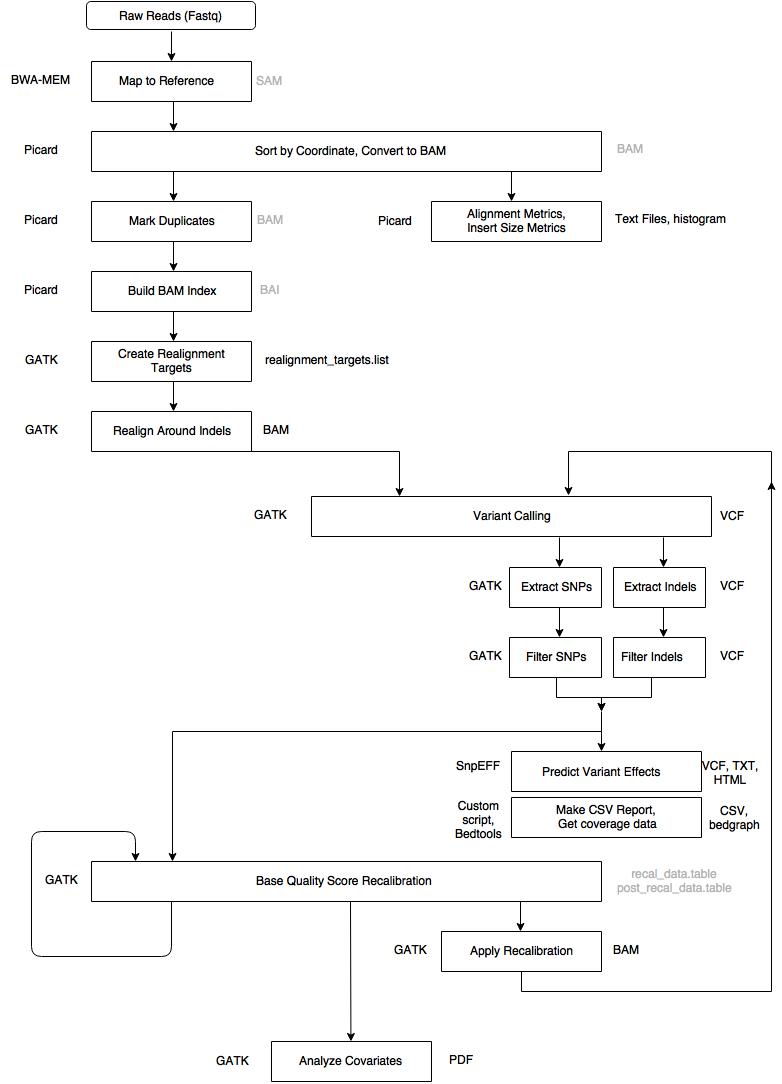
Step 1: Alignment - Map to Reference (BWA MEM)
- Input: .fastq files, reference genome
- Output: aligned_reads.sam (intermediary)
Map reads to reference genome using BWA MEM. The -M flag is required for Picard and GATK compatibility. Read group information is required by GATK and must be included at this step.
bwa mem -M -R '@RG\tID:sample_1\tLB:sample_1\tPL:ILLUMINA\tPM:HISEQ\tSM:sample_1' ref input_1 input_2 > aligned_reads.sam
Step 2: Sort SAM file by coordinate, convert to BAM (Picard)
- Input: aligned_reads.sam
- Output: sorted_reads.bam (intermediary)
Sort the aligned reads by coordinate and convert to BAM format using Picard SortSam.
java -jar picard.jar SortSam INPUT=aligned_reads.sam OUTPUT=sorted_reads.bam SORT_ORDER=coordinate
Step 3: Collect Alignment & Insert Size Metrics (Picard, R, Samtools)
- Input: sorted_reads.bam, reference genome
- Output: alignment_metrics.txt, insert_metrics.txt, insert_size_histogram.pdf, depth_out.txt
Collect alignment and insert size metrics to assess the quality of the data. R is required to generate the insert size histogram.
java -jar picard.jar CollectAlignmentSummaryMetrics R=ref I=sorted_reads.bam O=alignment_metrics.txt
java -jar picard.jar CollectInsertSizeMetrics INPUT=sorted_reads.bam OUTPUT=insert_metrics.txt HISTOGRAM_FILE=insert_size_histogram.pdf
samtools depth -a sorted_reads.bam > depth_out.txt
Step 4: Mark Duplicates (Picard)
- Input: sorted_reads.bam
- Output: dedup_reads.bam (intermediary), metrics.txt
Mark duplicate reads to avoid counting them during variant calling.
java -jar picard.jar MarkDuplicates INPUT=sorted_reads.bam OUTPUT=dedup_reads.bam METRICS_FILE=metrics.txt
Step 5: Build BAM Index (Picard)
- Input: dedup_reads.bam
- Output: dedup_reads.bai (intermediary)
Build a BAM index for the deduplicated BAM file, which is required for downstream GATK processing.
java -jar picard.jar BuildBamIndex INPUT=dedup_reads.bam
Step 6: Create Realignment Targets (GATK)
- Input: dedup_reads.bam, reference genome
- Output: realignment_targets.list
This is the first step in a two-step process of realigning reads around indels. This step identifies regions that need to be realigned.
java -jar GenomeAnalysisTK.jar -T RealignerTargetCreator -R ref -I dedup_reads.bam -o realignment_targets.list
Step 7: Realign Indels (GATK)
- Input: dedup_reads.bam, realignment_targets.list, reference genome
- Output: realigned_reads.bam
This step performs the actual realignment around the indels identified in the previous step.
java -jar GenomeAnalysisTK.jar -T IndelRealigner -R ref -I dedup_reads.bam -targetIntervals realignment_targets.list -o realigned_reads.bam
Step 8: Call Variants (GATK)
- Input: realigned_reads.bam, reference genome
- Output: raw_variants.vcf
Perform the first round of variant calling using GATK HaplotypeCaller on the realigned BAM file.
java -jar GenomeAnalysisTK.jar -T HaplotypeCaller -R ref -I realigned_reads.bam -o raw_variants.vcf
Step 9: Extract SNPs & Indels (GATK)
- Input: raw_variants.vcf, reference genome
- Output: raw_snps.vcf, raw_indels.vcf
Separate the raw variants into SNPs and Indels so they can be processed and filtered independently.
java -jar GenomeAnalysisTK.jar -T SelectVariants -R ref -V raw_variants.vcf -selectType SNP -o raw_snps.vcf
java -jar GenomeAnalysisTK.jar -T SelectVariants -R ref -V raw_variants.vcf -selectType INDEL -o raw_indels.vcf
Step 10: Filter SNPs (GATK)
- Input: raw_snps.vcf, reference genome
- Output: filtered_snps.vcf
Apply hard filters to the SNP call set. Filter criteria: QD < 2.0, FS > 60.0, MQ < 40.0, MQRankSum < -12.5, ReadPosRankSum < -8.0, SOR > 4.0.
java -jar GenomeAnalysisTK.jar -T VariantFiltration -R ref -V raw_snps.vcf --filterExpression 'QD < 2.0 || FS > 60.0 || MQ < 40.0 || MQRankSum < -12.5 || ReadPosRankSum < -8.0 || SOR > 4.0' --filterName "basic_snp_filter" -o filtered_snps.vcf
Step 11: Filter Indels (GATK)
- Input: raw_indels.vcf, reference genome
- Output: filtered_indels.vcf
Apply hard filters to the Indel call set. Filter criteria: QD < 2.0, FS > 200.0, ReadPosRankSum < -20.0, SOR > 10.0.
java -jar GenomeAnalysisTK.jar -T VariantFiltration -R ref -V raw_indels.vcf --filterExpression 'QD < 2.0 || FS > 200.0 || ReadPosRankSum < -20.0 || SOR > 10.0' --filterName "basic_indel_filter" -o filtered_indels.vcf
Step 12: Base Quality Score Recalibration #1 (GATK)
- Input: realigned_reads.bam, filtered_snps.vcf, filtered_indels.vcf, reference genome
- Output: recal_data.table (intermediary)
BQSR is performed twice. The second pass is optional but required if you want to generate the recalibration report. The filtered SNPs and Indels from previous steps are used as known sites.
java -jar GenomeAnalysisTK.jar -T BaseRecalibrator -R ref -I realigned_reads.bam -knownSites filtered_snps.vcf -knownSites filtered_indels.vcf -o recal_data.table
Step 13: Base Quality Score Recalibration #2 (GATK)
- Input: recal_data.table, realigned_reads.bam, filtered_snps.vcf, filtered_indels.vcf, reference genome
- Output: post_recal_data.table (intermediary)
This step takes the output from the first BQSR run as additional input for generating the recalibration report.
java -jar GenomeAnalysisTK.jar -T BaseRecalibrator -R ref -I realigned_reads.bam -knownSites filtered_snps.vcf -knownSites filtered_indels.vcf -BQSR recal_data.table -o post_recal_data.table
Step 14: Analyze Covariates (GATK)
- Input: recal_data.table, post_recal_data.table, reference genome
- Output: recalibration_plots.pdf
Produces a recalibration report based on the two BQSR runs. This report can be used to assess the quality of the recalibration.
java -jar GenomeAnalysisTK.jar -T AnalyzeCovariates -R ref -before recal_data.table -after post_recal_data.table -plots recalibration_plots.pdf
Step 15: Apply BQSR (GATK)
- Input: recal_data.table, realigned_reads.bam, reference genome
- Output: recal_reads.bam
Apply the recalibration computed in the first BQSR step to the BAM file.
java -jar GenomeAnalysisTK.jar -T PrintReads -R ref -I realigned_reads.bam -BQSR recal_data.table -o recal_reads.bam
Step 16: Call Variants (GATK)
- Input: recal_reads.bam, reference genome
- Output: raw_variants_recal.vcf
Second round of variant calling performed on the recalibrated BAM file.
java -jar GenomeAnalysisTK.jar -T HaplotypeCaller -R ref -I recal_reads.bam -o raw_variants_recal.vcf
Step 17: Extract SNPs & Indels (GATK)
- Input: raw_variants_recal.vcf, reference genome
- Output: raw_snps_recal.vcf, raw_indels_recal.vcf
Separate the recalibrated variants into SNPs and Indels.
java -jar GenomeAnalysisTK.jar -T SelectVariants -R ref -V raw_variants_recal.vcf -selectType SNP -o raw_snps_recal.vcf
java -jar GenomeAnalysisTK.jar -T SelectVariants -R ref -V raw_variants_recal.vcf -selectType INDEL -o raw_indels_recal.vcf
Step 18: Filter SNPs (GATK)
- Input: raw_snps_recal.vcf, reference genome
- Output: filtered_snps_final.vcf
Apply the same hard filters as Step 10 to the recalibrated SNP call set. Filter criteria: QD < 2.0, FS > 60.0, MQ < 40.0, MQRankSum < -12.5, ReadPosRankSum < -8.0, SOR > 4.0.
java -jar GenomeAnalysisTK.jar -T VariantFiltration -R ref -V raw_snps_recal.vcf --filterExpression 'QD < 2.0 || FS > 60.0 || MQ < 40.0 || MQRankSum < -12.5 || ReadPosRankSum < -8.0 || SOR > 4.0' --filterName "basic_snp_filter" -o filtered_snps_final.vcf
Step 19: Filter Indels (GATK)
- Input: raw_indels_recal.vcf, reference genome
- Output: filtered_indels_recal.vcf
Apply the same hard filters as Step 11 to the recalibrated Indel call set. Filter criteria: QD < 2.0, FS > 200.0, ReadPosRankSum < -20.0, SOR > 10.0.
java -jar GenomeAnalysisTK.jar -T VariantFiltration -R ref -V raw_indels_recal.vcf --filterExpression 'QD < 2.0 || FS > 200.0 || ReadPosRankSum < -20.0 || SOR > 10.0' --filterName "basic_indel_filter" -o filtered_indels_recal.vcf
Step 20: Annotate SNPs and Predict Effects (SnpEff)
- Input: filtered_snps_final.vcf
- Output: filtered_snps_final.ann.vcf, snpeff_summary.html, snpEff_genes.txt
Use SnpEff to annotate the filtered SNPs and predict the effects of the variants on genes and proteins.
java -jar snpEff.jar -v snpeff_db filtered_snps_final.vcf > filtered_snps_final.ann.vcf
Step 21: Compute Coverage Statistics (Bedtools)
- Input: recal_reads.bam
- Output: genomecov.bedgraph
Compute genome coverage statistics. The resulting bedgraph file can be loaded into IGV to view a coverage map across the genome.
bedtools genomecov -bga -ibam recal_reads.bam > genomecov.bedgraph
Step 22: Compile Statistics (parse_metrics.sh - in house)
- Input: alignment_metrics.txt, insert_metrics.txt, raw_snps.vcf, filtered_snps.vcf, raw_snps_recal.vcf, filtered_snps_final.vcf, depth_out.txt
- Output: report.csv
An in-house script that compiles summary statistics from various outputs into a single CSV report. The report includes:
- Number of Reads
- Number of Aligned Reads
- Percentage Aligned
- Number of Aligned Bases
- Read Length
- Percentage Paired
- Mean Insert Size
- Number of SNPs
- Number of Filtered SNPs
- Number of SNPs after BQSR
- Number of Filtered SNPs after BQSR
- Average Coverage
Important Notes
- This pipeline assumes that there are no known variants for the organism of interest. Because of this, the first round of variant calling and filtering is performed to generate a set of known SNPs and Indels to be used in the BQSR step (bootstrapping).
- The current script is designed for Paired End data. Contact us if you need to run the pipeline on Single End reads.
- A maximum of 25 libraries can be processed at a time due to HPC queue limits. Contact us if you need to process more than 25 libraries.
This pipeline was presented at the NYU-HiTS seminar on March 03, 2016. Slides are available here.
16 Comments
Hi,
I am Minju, a master student of Dept. of Biology, performing computational research with HTS data.
my question is that where could I get the file, GenomeAnalysisTK.jar. because the Broad Institute, the developer, only provide GenomeAnalysisTK.tar which means I can’t execute the commands(specifically I am stuck in the Step 8: raw variant calling)
“Error: Unable to access jarfile GenomeAnalysisTK.jar”
error message from the mercer.
I want to ask you some solutions either for A or B.
A. how can I modify the command given in Step 8, if I want to call the variants with GATK.tar
B. where should I get GATK.jar
Hi Minju,
On mercer, you need to call the full path to the GATK jar file (after loading the GATK module). Your command should look like this:
java -jar /share/apps/gatk/3.3-0/GenomeAnalysisTK.jar -T HaplotypeCaller -R ref -I realigned_reads.bam -o raw_variants.vcf
.tar is the compressed form of the GATK tool.
uncompressed it using a linux command
tar -zxvf yourfile.tar.gz
Hi,
I use more or leass the same tools.
Several comments on your pipeline:
Where do you put the read groups in the BAM that are necessary for GATK ?
The Base Quality Score Recalibration from GATK works with dbSNP and not with the variant you just call for the -knownSites option. Read the manual from GATK : https://software.broadinstitute.org/gatk/gatkdocs/org_broadinstitute_gatk_tools_walkers_bqsr_BaseRecalibrator.php
The point of the recalibration is to use known genuine SNP in order to improve your calling.
Hi Wilfrid,
Thanks for your feedback. Answers to your questions:
1) The read groups are provided during the alignment step. I’ve updated the post to include this (step 1)
2) You are correct, and where possible you should use a ‘gold standard’ set of variants for the BQSR step. Unfortunately, this data is not available for all organisms, and in these cases, it is necessary to do what is known as ‘bootstrapping’ to produce a set of variants to use at this step, which is what I have demonstrated above. See: http://gatkforums.broadinstitute.org/wdl/discussion/1247/what-should-i-use-as-known-variants-sites-for-running-tool-x
See “Important Notes” above: The pipeline assumes no known variants are available for the Base Quality Score Recalibration step and as such bootsraps a set of SNPs and Indels to provide as input at this step.
Hi there,
your pipeline is quite straightforward and promising, I figured out this was done on only one sample, can you provide a detailed instruction on multiple samples?
Thanks,
Kai
Hi,
I am a PHD student and trying to run the codes step by step. When I followed the steps and ran Step 10, there were warnings said “undefined variable MQRankSum”. How can I solve this problem? Thanks for your time.
Hi Malisa,
Is this happening only for certain lines? If so, I believe this means that there is no MQRankSum annotation for that particular site. In this case, you can ignore these warnings.
Hi Mohammed,
The pipeline you elaborated is good, please keep up the good work. It will help many. You have explained it well and kept it simple and lucid.
well, i was wondering, from where “depth_out.txt” you are sourcing out?
just i am curious to know…
Keep up the good work !!!
Cheers,
David
Hi David,
Thanks for the kind words! the ’depth_out.txt’ file is created using the samtools depth utility, see Step 3 above (Collect Alignment & Insert Size Metrics).
Hi David really nice work!
Just a quick question. The GATK website says that you actually don’t need to run IndelRealigner if you are going to use Haplotypecaller. But this is in your steps. Would you recommend it anyway?
thanks
ib
Hi Irene, thanks for the feedback! At the time of writing this post, IndelRealigner was a recommended step in the GATK best practices. With the latest version of Haplotypecaller, it seems this step is no longer required, so I think you are safe to skip it.
Apologies misread your name Mohammed 🙂
Hi
In step 10 i want to add “GQ < 30" but GQ is not in INFO field, how can i do it? it must be as following order.
–filterExpression "QUAL 60.0 || MQ < 30.0 || DP < 10 || GQ < 30"
Thanks in advance
Hi Mohammed,
Thanks for your pipeline, it helped me a lot on calling SNPs from the files I work with. Now, I have a question about statistics, how can I know that the SNPs I have identified in this pipeline are actually significant? Which statistical test should I choose, if so, and how do I apply such test to the data-set?
Hi,
I am a Masters student, I was looking for something similar to workflow presented here and am glad I came across your work.
You mentioned about Compile Statistics in step 22, a Tool, parse_metrics.sh (in-house). Am interest in knowing how it works and I would like to use it to produce the report.
Thank you
I have one question, can I apply this pipleline for plant viruses? Also, how can I create a custom SnpEff Database?
Hi
I’m wondering if an extra “SelectVariants” step is necessary to select only SNP with “PASS” tag after step 10 before used as knownsites in Step12. I’ve seen an example doing SelectVariants with -select ‘vc.isNotFiltered()’. Does BaseRecalibrator use SNP with ‘PASS” tag only in filtered_snps.vcf? I appreciate your insights.
Hi Tom,
This is not necessary. BQSR will only consider SNPs with “PASS” when doing recalibration, so you can give it filtered_snps.vcf directly.
your pipeline is good. Can you recommend your paper using this pipeline to analyse to me? Thanks very much.
Hi Mohammed,
can you run step 20 if you have done steps 16-19 in g mode?
if yes, can you please share the command?
thanks,
ib
Your pipeline is quite thorough. I’m wondering if this is available to non NYU users.
Hi Mohammed,
Thanks for posting nice and detailed analysis pipeline for variant calling. I am doing bacterial genome SNP/indel calling. I have few questions to ask;
1. Which versions of GATK, SnpEff, Samtools, Bedtools were used in your pipeline?
2. What parameters you suggest for filtering SNPs/Indels for bacterial genomes?
3. What these parameters mean: QD 200.0, ReadPosRankSum 10.0? Are there any cut off standards for calling SNPs/Indels for bacterial genomes?